Dictionaries
Cadmus supports offline word definitions. You can look up any word while reading by long-pressing it. Dictionaries are stored on your device and work without an internet connection once downloaded.
Cadmus integrates with reader-dict, an open-source project that provides high-quality monolingual dictionaries (where you look up a word and get a definition in the same language) for many languages.
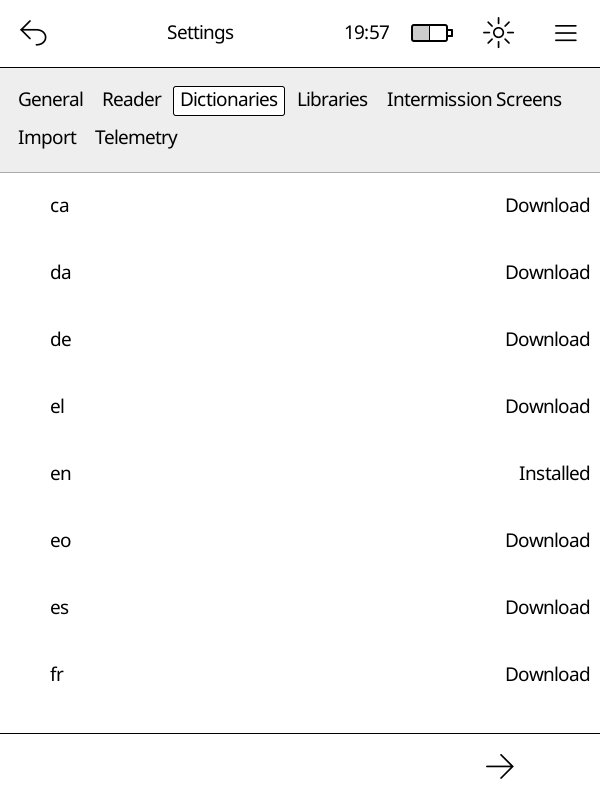
Opening the Dictionaries Tab
Go to Main Menu → Settings → Dictionaries.
You will see a list of available languages. Each row shows the language code and its current status.
Statuses
| Status | What it means |
|---|---|
| Download | Not yet on your device — tap to download |
| Downloading | A download is in progress |
| Installed | Ready to use |
| Update Available | A newer version is available |
Downloading a Dictionary
Important
Your device must be connected to Wi-Fi before you can download a dictionary.
- Open Main Menu → Settings → Dictionaries.
- Find the language you want.
- Tap Download next to it.
A progress notification appears at the top of the screen while the file downloads. Once the download finishes, Cadmus begins indexing the dictionary automatically.
Updating a Dictionary
When a newer version is available the status shows Update Available.
- Tap the language row.
- Select Update from the menu.
The updated dictionary replaces the old one automatically.
Re-downloading a Dictionary
If a dictionary is already installed you can re-download it to get a fresh copy:
- Tap the language row.
- Select Re-download from the menu.
Deleting a Dictionary
- Tap the language row.
- Select Delete from the menu.
The dictionary files are removed from your device.
How Indexing Works
After you download, update, or re-download a dictionary, Cadmus needs to index it before you can look up words. Indexing reads every word in the dictionary and stores it in a database on disk so that lookups are fast without loading the entire dictionary into memory. This is especially important on devices with limited memory.
A notification with a progress bar appears at the top of the screen while indexing is in progress.
Note
You can keep reading while indexing runs in the background. Words that have already been indexed are available for lookup right away, so you may get partial results until indexing finishes.
What happens when you restart your Kobo
If your Kobo restarts or shuts down while indexing is still running, Cadmus picks up where it left off the next time it starts. It does not start over from the beginning.
When does re-indexing happen
Cadmus automatically re-indexes a dictionary when you:
- Update it to a newer version
- Re-download it
- Delete it (the old index is removed)
You do not need to trigger indexing yourself — it happens automatically whenever the dictionary files change.
Where Dictionaries are Stored
Cadmus stores dictionaries in different locations depending on whether your device has an SD card and whether you are using a test build:
- On devices with an SD card:
- Production:
/mnt/sd/.cadmus/dictionaries/reader-dict/<lang>/ - Test build:
/mnt/sd/.cadmus-tst/dictionaries/reader-dict/<lang>/
- Production:
- On devices without an SD card:
- Production:
/mnt/onboard/.adds/cadmus/dictionaries/reader-dict/<lang>/ - Test build:
/mnt/onboard/.adds/cadmus-tst/dictionaries/reader-dict/<lang>/
- Production:
Each language gets its own subfolder containing a .dict.dz (or .dict) and a .index file.
Note
If your SD card is already inserted when you upgrade Cadmus, your dictionaries are moved to the SD card automatically on the next boot. If you insert an SD card after Cadmus has already run, move the
dictionaries/folder manually — see Moving data to an SD card.